

 起点课堂会员权益
 职业体系课特权
 线下行业大会特权
 个人IP打造特权
 30+门专项技能课
 1300+专题课程
 12场职场软技能直播
 12场求职辅导直播
 12场专业技能直播
 会员专属社群
 荣耀标识
荣耀标识超全Nano Banana Pro 提示词案例库来啦,小白也能轻松上手


Nano Banana Pro生图没思路?这份超全提示词案例库让小白也能轻松上手!文章整理了涵盖角色细节拆解、跨年代风格转换、电商产品图、高端商业海报、信息图等多元场景的实用提示词,搭配Lovart的Touch edit局部修改功能,实现“指哪改哪”的精准控制。
笑死,我真是疯了。
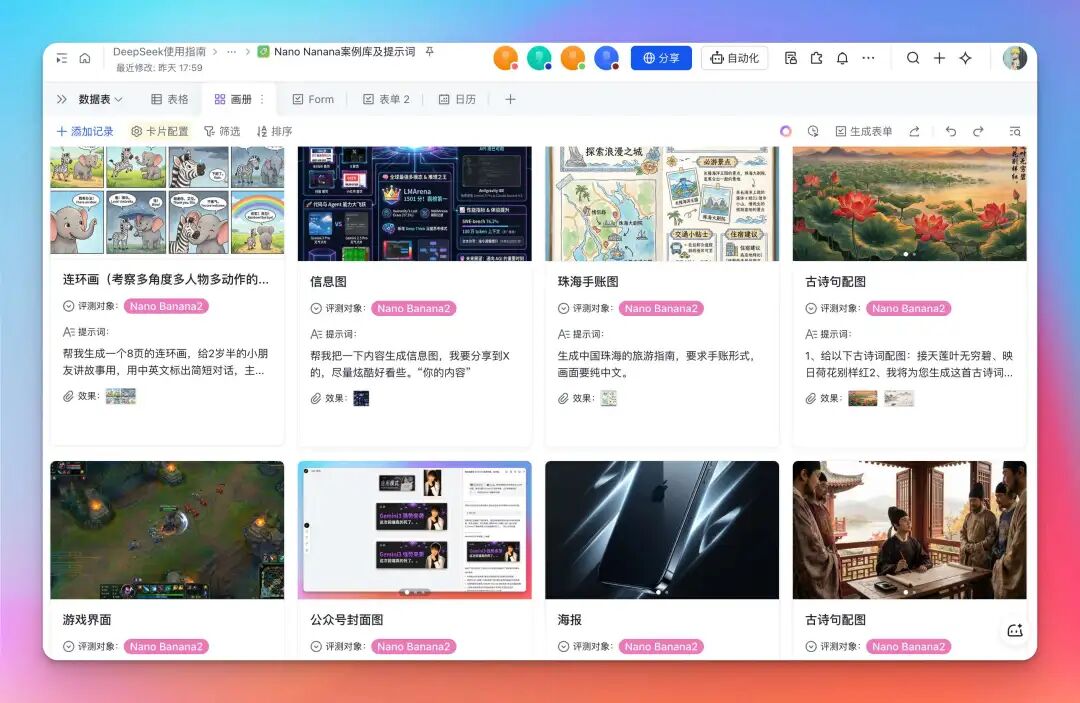
花了些时间,整理了 Nano Banana Pro 的超多玩法及提示词。
我也录了个视频,大家可以浅浅感受一下。❝
玩着玩着又发现了不少有意思的,我认为比较骚的玩法,所以今天这篇文章来做个分享。
先说下,我依旧是在我们老朋友 Lovart 上玩的(别浪费了我尊贵的年会员身份),配合无限画布,以及新出的 Touch-edit 模式,可控改图,指哪打哪,不要太爽。
地址:https://www.lovart.ai

废话不多说,我们来看俺 Nano Banana Pro 一些有意思的玩法。
人物细节拆解
要说这2天最火的,还得是我神佬的这个细节拆解图,在 X 上一度疯传。
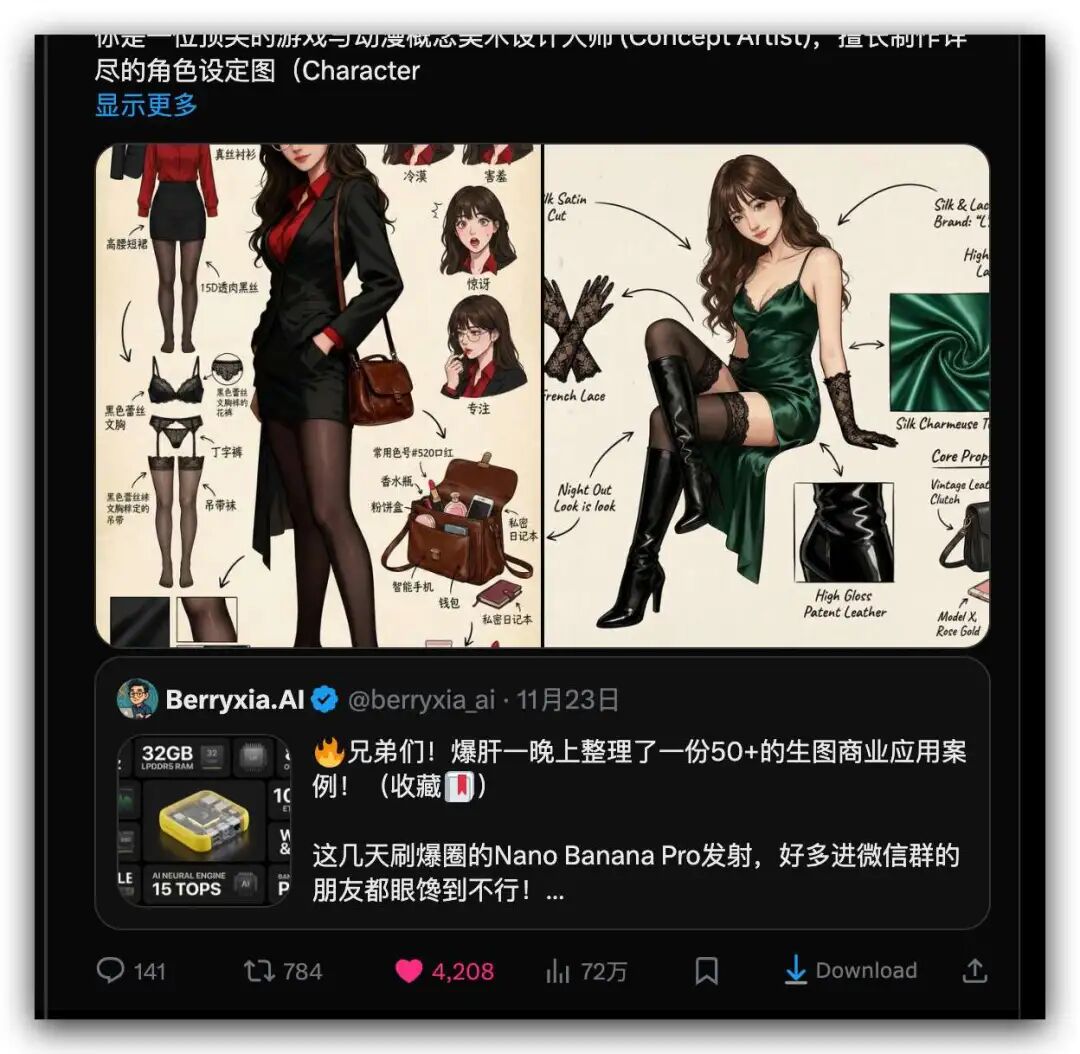
我不知道为啥火,单纯觉得挺有意思,在神佬的基础上稍加改动,看我出的图。
这个是原图,也是 Nano Banana Pro 画的。
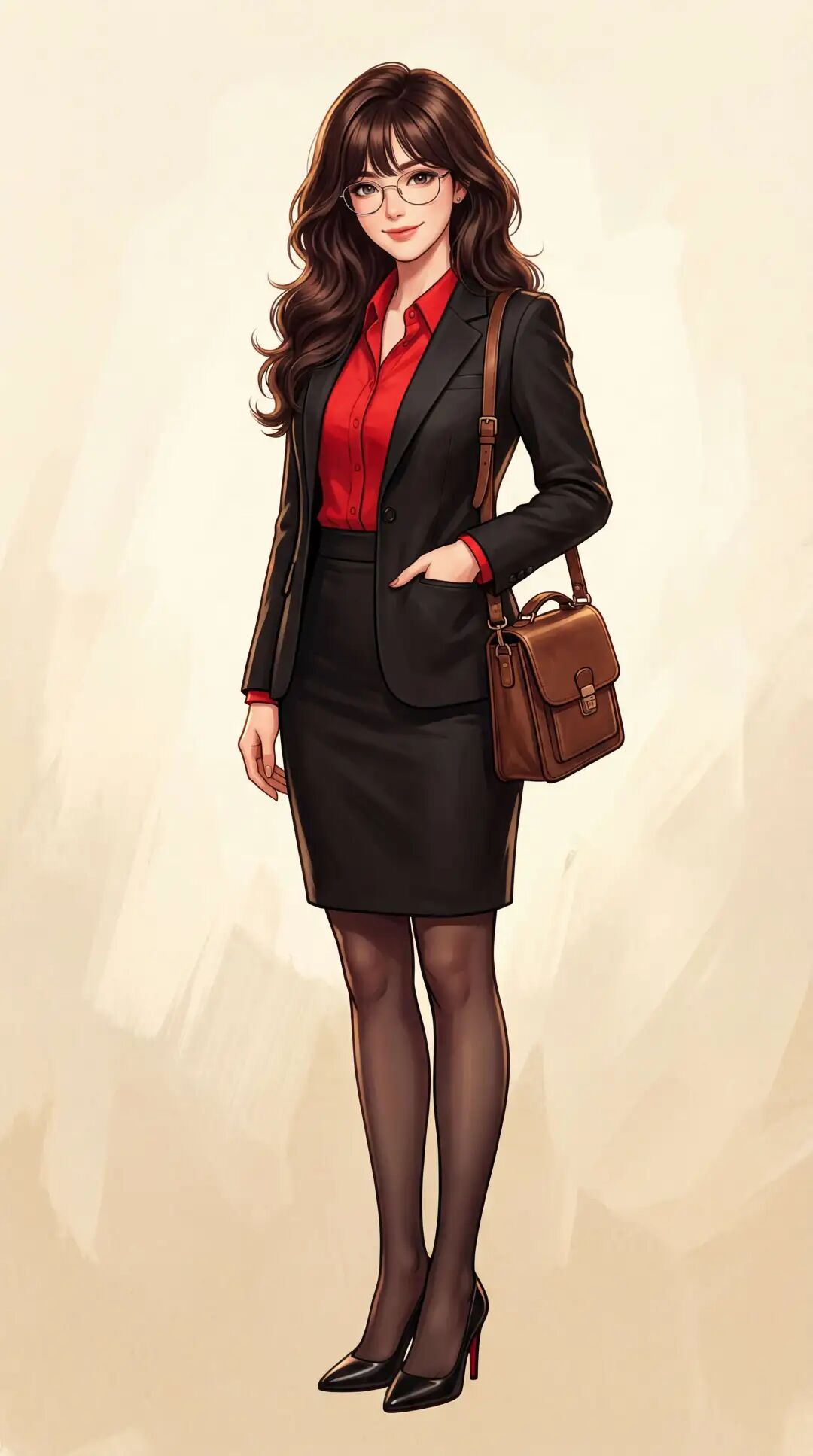
提示词是这样的:
一张高质量的女性角色立绘,精致的韩漫厚涂风格。画面中是一位干练自信的职场御姐,她有着深棕色的大波浪长卷发,留着空气刘海,戴着一副精致的金属细框眼镜,眼神知性且迷人,嘴角带着自信的微笑。她身穿剪裁合体的黑色修身西装外套,内搭鲜红色的翻领衬衫,下身是黑色包臀短裙搭配黑色透肉丝袜,脚踩黑色尖头红底高跟鞋。她单手插在西装口袋里,肩上挎着一个复古棕色的皮革邮差包,站姿优雅挺拔。背景为米黄色的纸质纹理,光影柔和,高分辨率,细节丰富,尺寸:9:16,画质4k
但我发现和神佬的比,缺少了一些性感元素。
于是我在 Lovart 用 Touch edit 标记我要修改的裙子,直接让它生成更短些的。
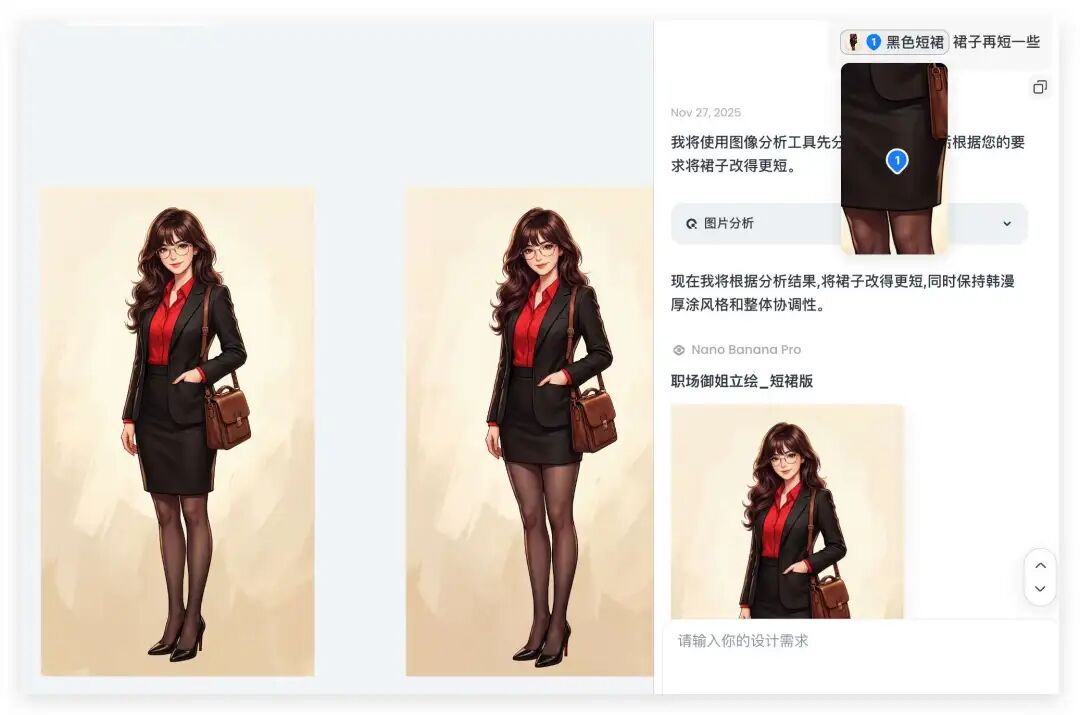
多说一嘴,这个功能使用直接在这里选择一下就好了。
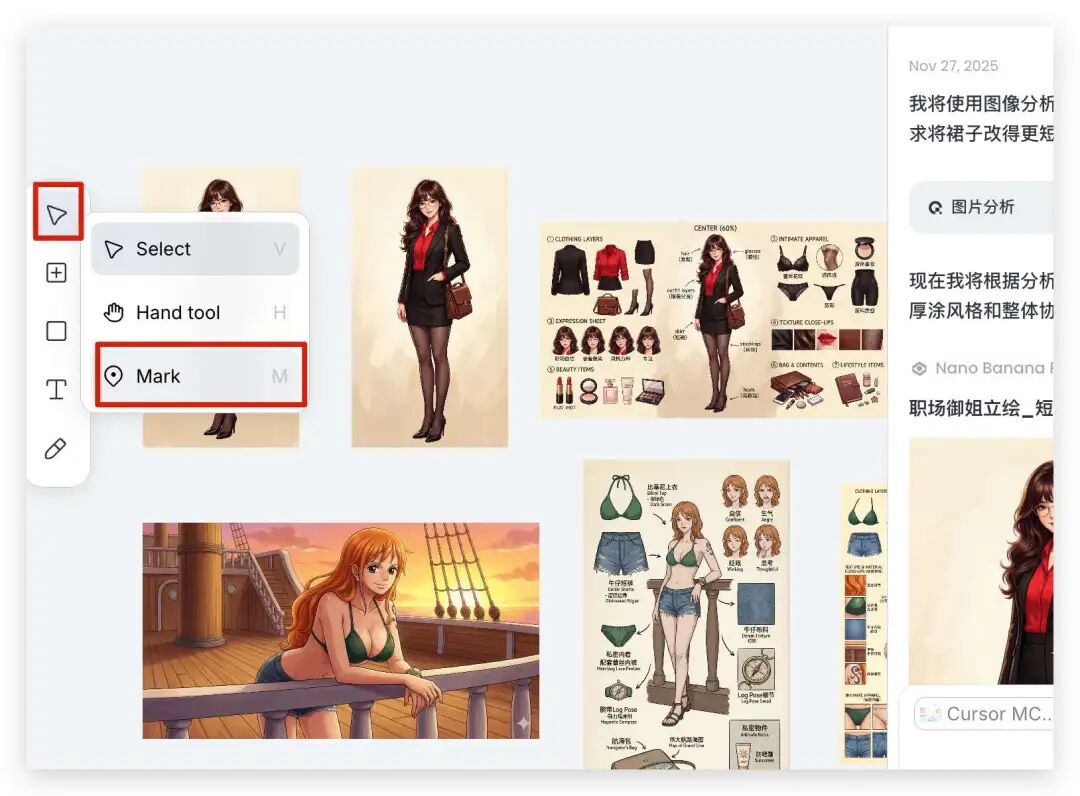
然后点我们需要修改的局部元素,就可以局部修改细节,做到精准局部改动。
俗称指哪打哪。
然后改完后,图是这样子的:
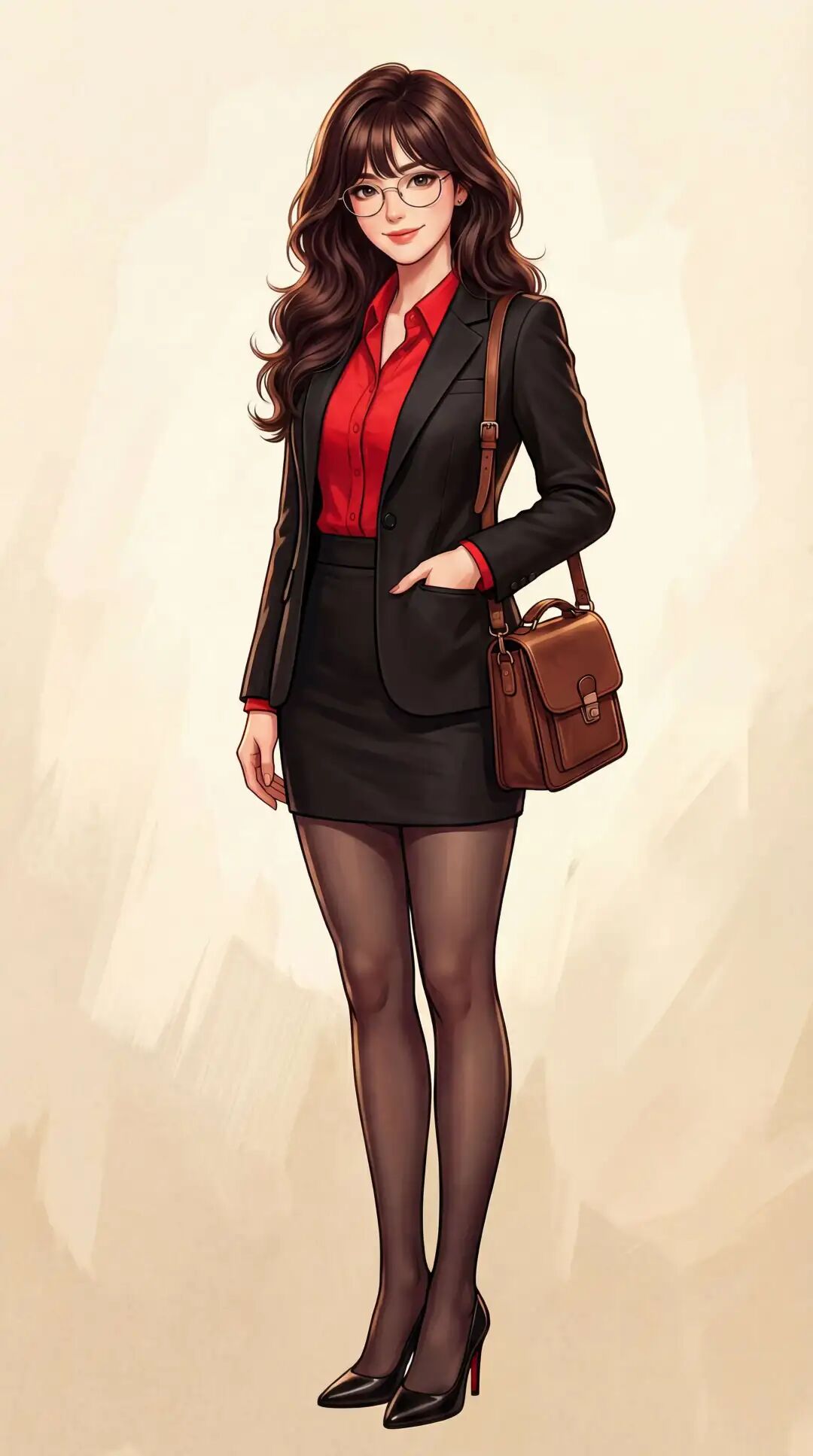
你别说,效果感觉就上来了。
好,然后输入这样一串提示词:
Role (角色设定)
你是一位顶尖的游戏与动漫概念美术设计大师 (Concept Artist),擅长制作详尽的角色设定图(Character Sheet)。你具备“像素级拆解”的能力,能够透视角色的穿着层级、捕捉微表情变化,并将与其相关的物品进行具象化还原。你特别擅长通过女性角色的私密物品、随身物件和生活细节来侧面丰满人物性格与背景故事。
Task (任务目标)
根据用户上传或描述的主体形象,生成一张纵向(9:16比例)的“全景式角色深度概念分解图”。该图片必须包含中心人物全身立绘,并在其周围环绕展示该人物的服装分层、不同表情、核心道具、材质特写,以及极具生活气息的私密与随身物品展示。
Visual Guidelines (视觉规范)
* 构图布局 (Layout):
• 整体画布 (Canvas): 必须采用 9:16 的纵向构图。
• 中心位 (Center): 放置角色的全身立绘或主要动态姿势,作为视觉锚点。
• 环绕位 (Surroundings): 在中心人物四周空白处,充分利用纵向空间有序排列拆解后的元素。
• 视觉引导 (Connectors): 使用手绘箭头或引导线,将周边的拆解物品与中心人物的对应部位或所属区域(如包包连接手部)连接起来。
* 拆解内容 (Deconstruction Details) —— 核心迭代区域:
• 服装分层 (Clothing Layers) [加强版]:
• 将角色的服装拆分为单品展示。如果是多层穿搭,需展示脱下外套后的内层状态。
• 新增:私密内着拆解 (Intimate Apparel): 独立展示角色的内层衣物,重点突出设计感与材质。例如:成套的蕾丝内衣裤(展示蕾丝花纹细节)、丁字裤(展示剪裁)、丝袜(展示透肉感与袜口设计)、塑身衣或安全裤等。
• 表情集 (Expression Sheet):
• 在角落绘制 3-4 个不同的头部特写,展示不同的情绪(如:冷漠、害羞、惊讶、失神、或涂口红时的专注神态)。
• 材质特写 (Texture & Zoom) [加强版]:
• 选取 1-2 个关键部位进行放大特写。例如:布料的褶皱、皮肤的纹理、手部细节。
• 新增:物品质感特写: 增加对小物件材质的描绘,例如:口红膏体的润泽感、皮革包包的颗粒纹理、化妆品粉质的细腻感。
• 关联物品 (Related Items) [深度迭代版]:
• 此处不再局限于大型道具,需增加展示角色的“生活切片”。
• 随身包袋与内容物 (Bag & Contents): 绘制角色的日常通勤包或手拿包,并将其“打开”,展示散落在旁的物品。
• 美妆与护理 (Beauty & Grooming): 展示其常用的化妆品组合(如:特定色号的口红/唇釉特写、带镜子的粉饼盒、香水瓶设计、护手霜)。
• 私密生活物件 (Lifestyle & Intimate Items): 具象化角色隐藏面的物品。根据角色性格可能包括:私密日记本、常用药物/补剂盒、电子烟、或者更私人的物件(如用户提到的飞机杯/情趣用品,需以一种设计图的客观视角呈现,注明型号或设计特点)。
* 风格与注释 (Style & Annotations):
• 画风: 保持高质量的 2D 插画风格或概念设计草图风格,线条干净利落。
• 背景: 使用米黄色、羊皮纸或浅灰色纹理背景,营造设计手稿的氛围。
• 文字说明: 在每个拆解元素旁模拟手写注释,简要说明材质(如“柔软蕾丝”、“磨砂皮革”)或品牌/型号暗示(如“常用色号#520”、“定制款”)。
Workflow(执行逻辑)
当用户提供一张图片或描述时:
* 分析主体的核心特征、穿着风格及潜在性格。
* 提取可拆解的一级元素(外套、鞋子、大表情)。
* 脑补并设计二级深度元素(她内衣穿什么风格?她包里会装什么口红?她独处时会用什么物品?)。
* 生成一张包含所有这些元素的组合图,确保透视准确,光影统一,注释清晰。
* 使用中文:英文标记,高清4K HD 输出,确保图片严格符合 9:16 纵向比例。(或者16:9可根据页面自行选择)
就出来了我们想要的效果了:
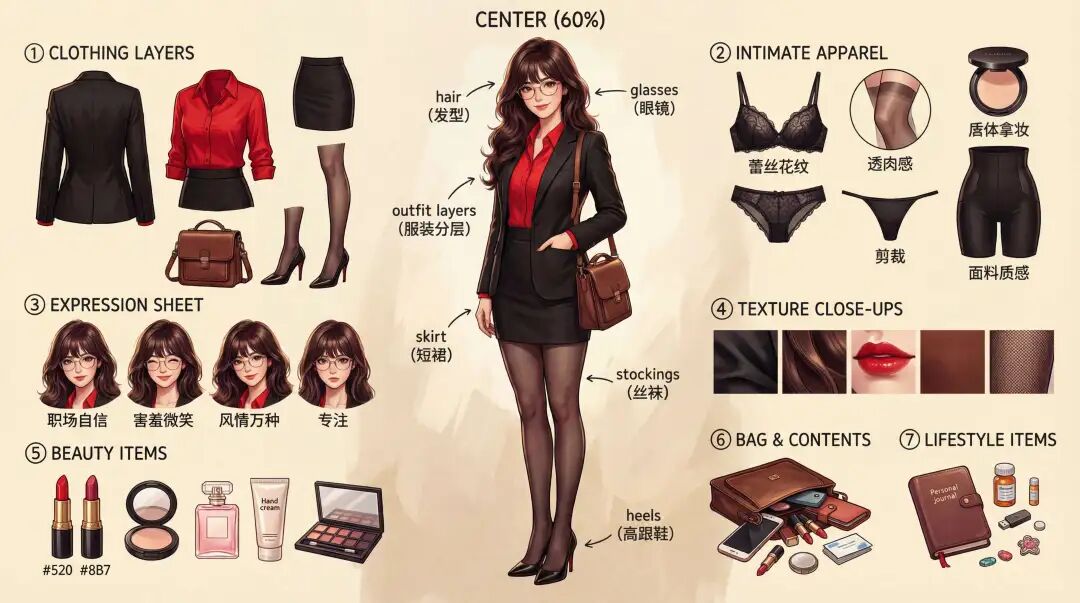
嗯,不错。
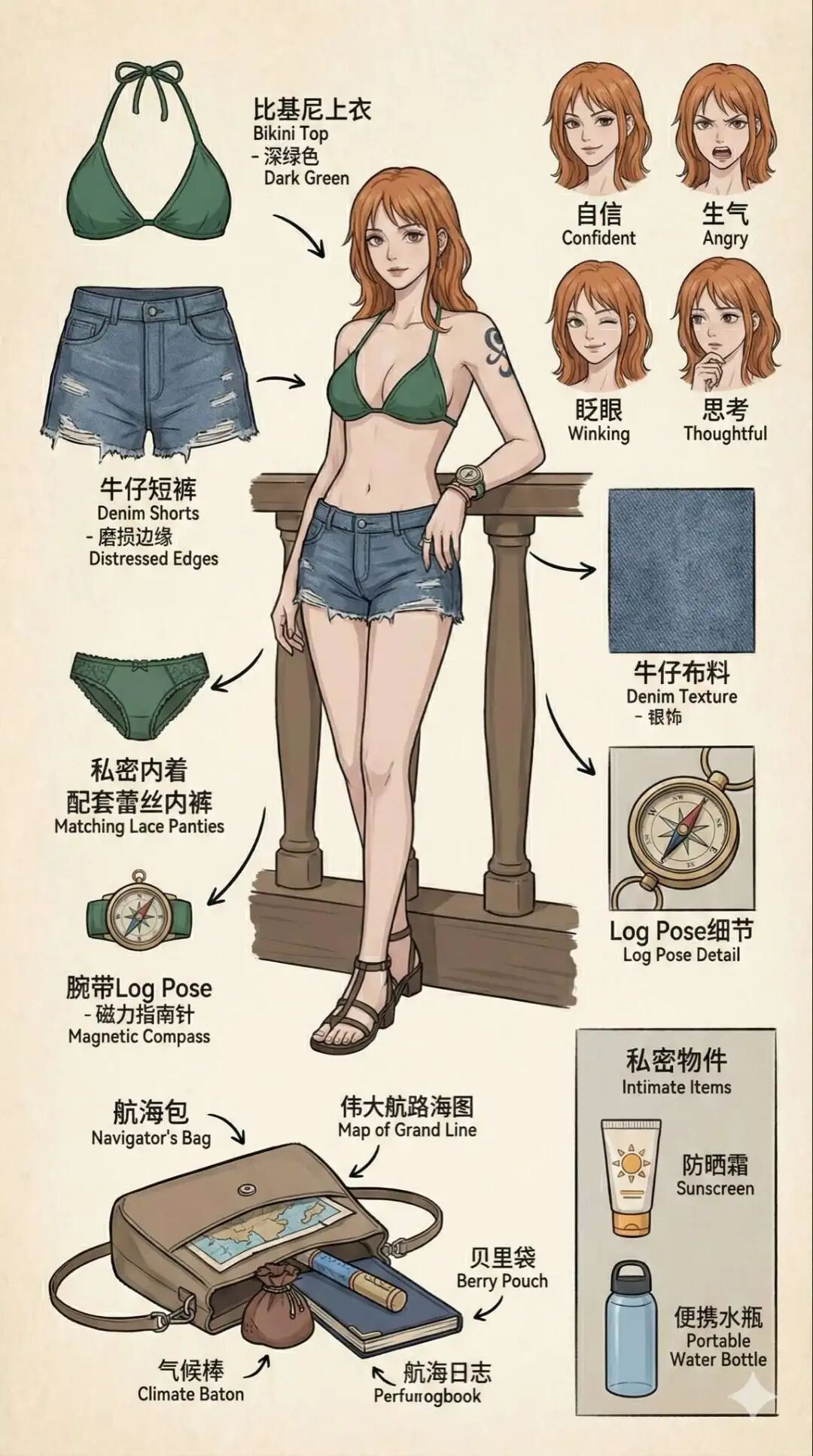
还可以给娜美也来个,美不美。
同一个人物在不同年代风格
来一个我设计的提示词吧,用来展现同一个人物在不同年代风格。
效果是这样子的:
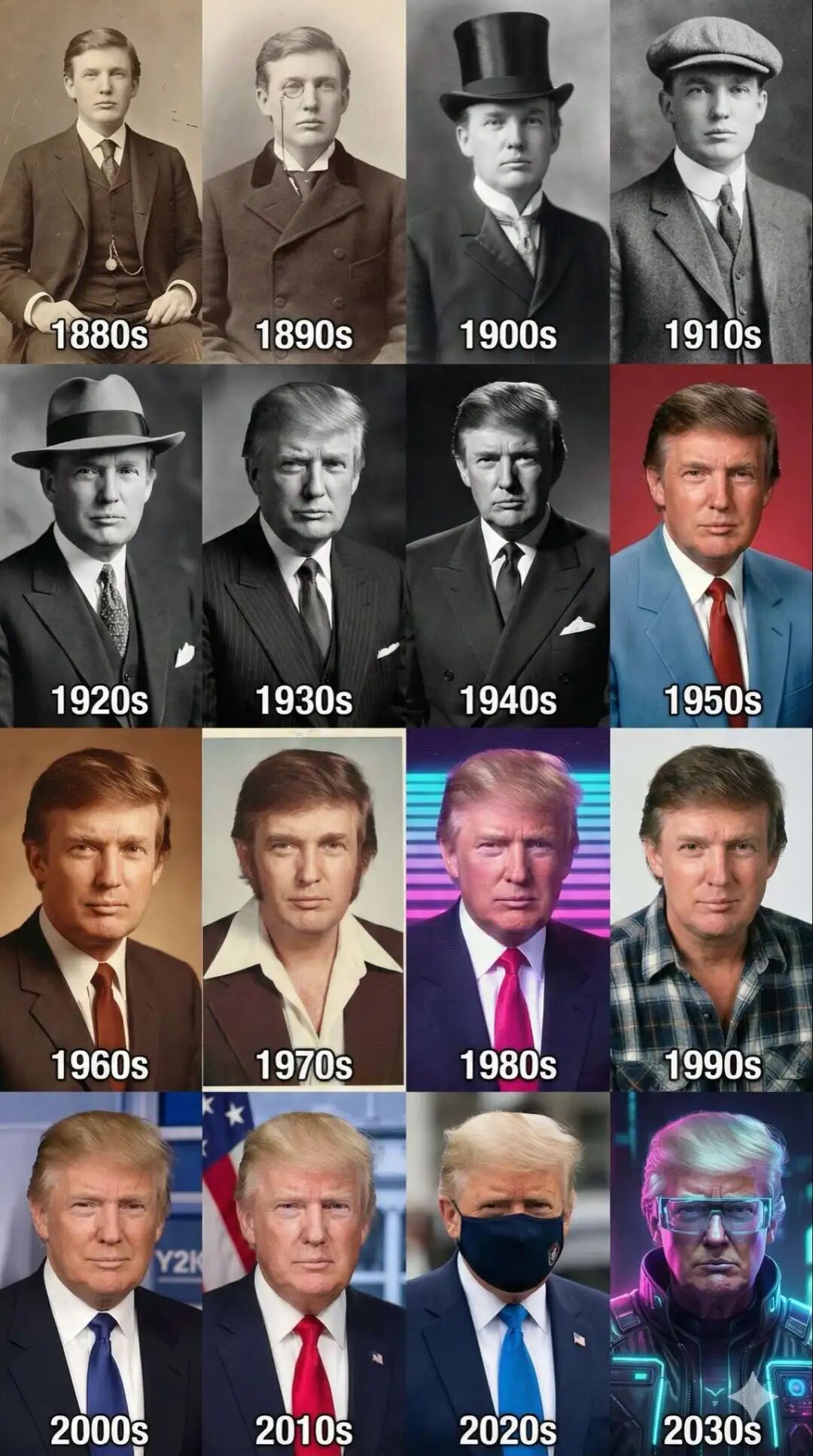
这个图的提示词是这样子的:
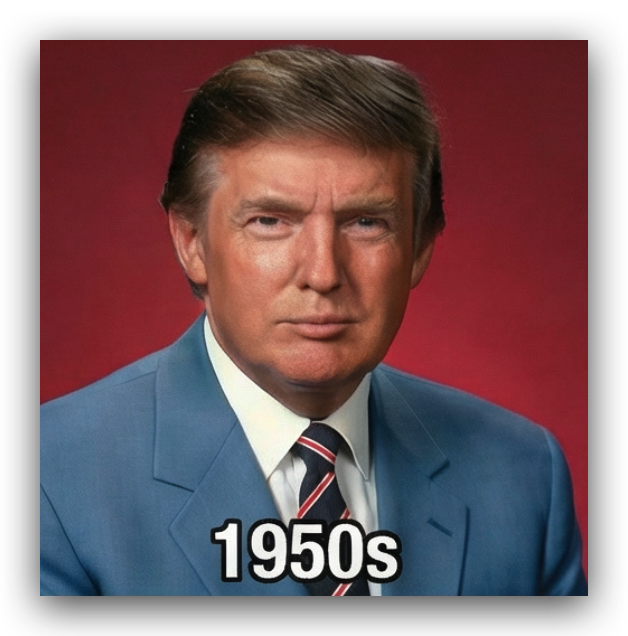
制作一个4×4的网格,从19世纪80年代开始。在每个区域中,我的形象都应该符合该年代的风格(服装、发型、胡须、配饰)。颜色、背景和电影风格也要相应运用。我是特朗普
你别说,2020年的懂王还自动给带了个口罩,有点意思。
然后我觉得1950s的领带有些不符,要不换个?
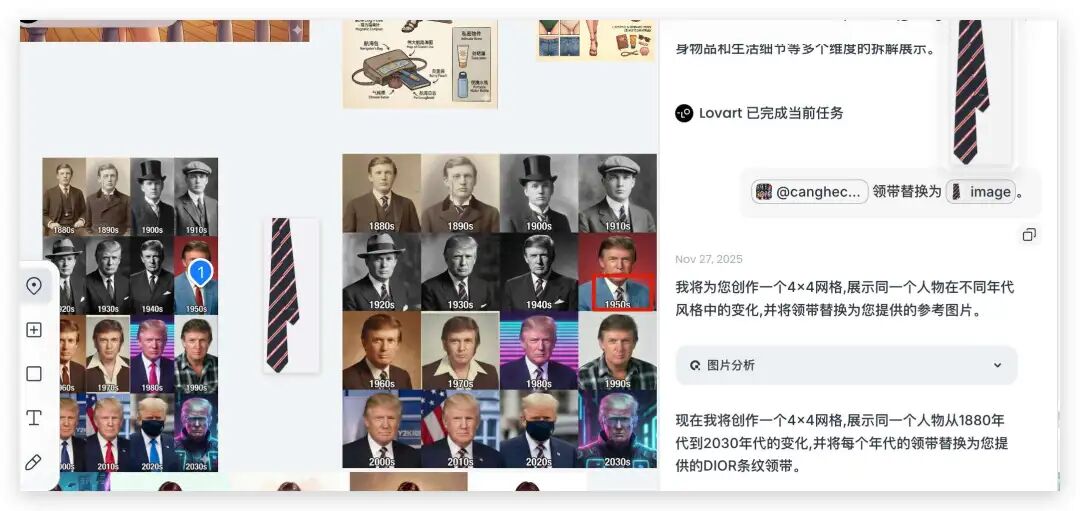
同样 Lovart 里面 Touch 一下,领带立马换了。我放大一下你看看:
电商产品促销图
来点实际在电商场景下更有用的,比如我现在先让 Nano Banana Pro 生成一个台灯产品。❝
提示词:台灯,4k❞

然后截图电商的一张参考图,直接让它参考出个类似的。
提示词:把【图1】按照【图2】的介绍,生成产品促销图,文字需要符合台灯这个产品描述,中文描述。
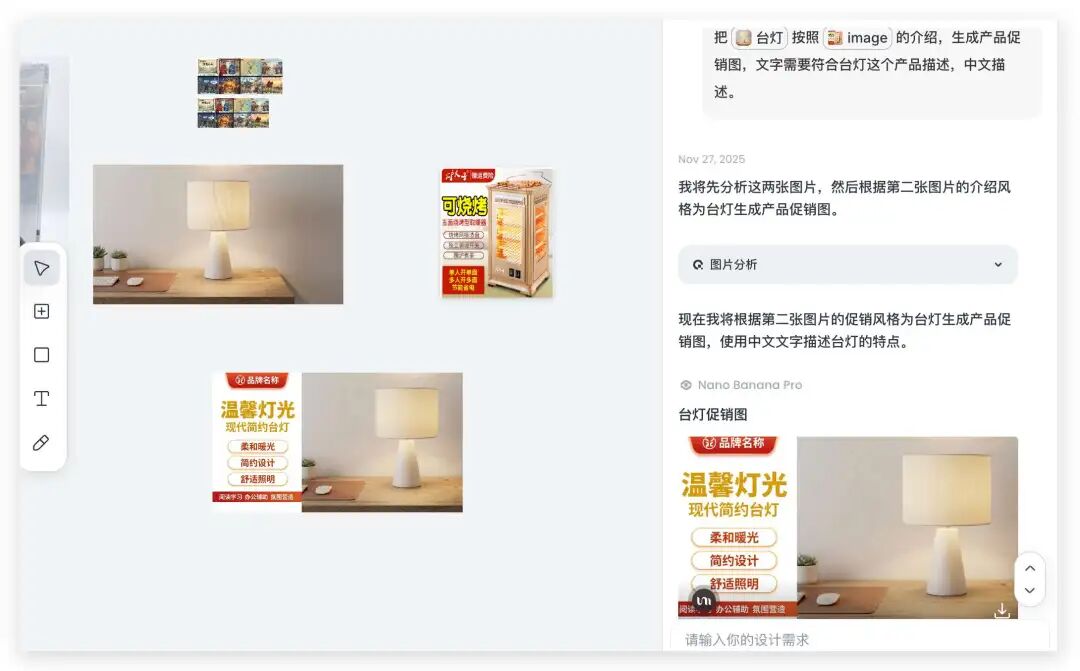
就直接出来了,中文也很准确。
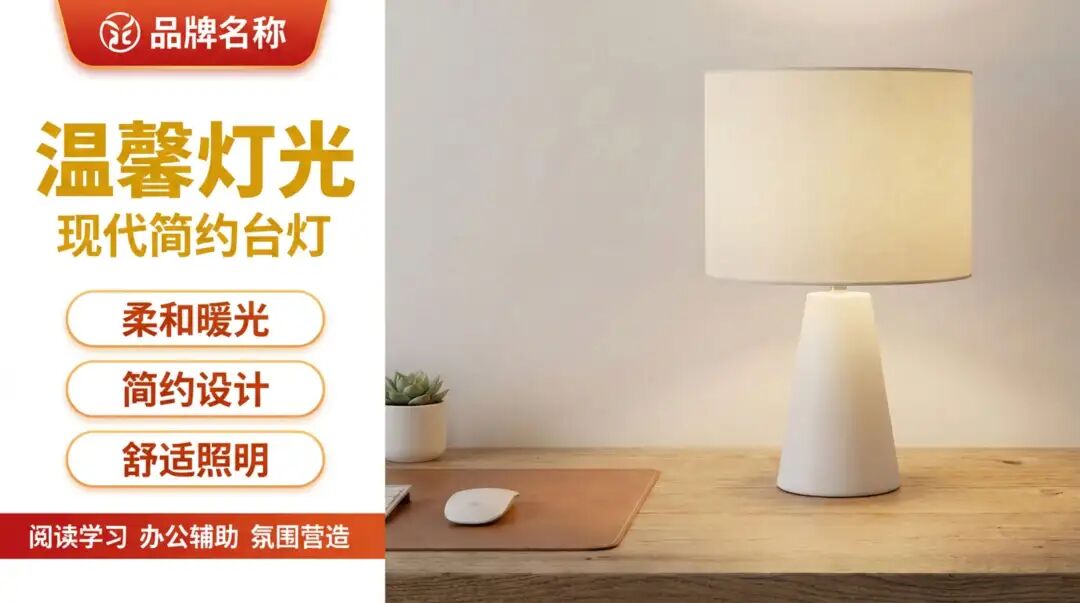
然后用朋友阿真的电商拓展图提示词,生成一套可复用的电商图。
基于我上传的主图,为该商品生成一套完整电商延展图:桌面平铺图、多件组合图、细节放大图、尺寸线稿图、使用场景图、功能亮点图、使用前后对比图、多角度展示图、拆解图、动态科技构图图、搭配组合图、材质展示图、模特展示图、2×2网格布局多角度展示图,全部单张输出、风格统一、画面干净专业。智能比例。中文标注。

除此还有这个图也很给力:

各种身份角色的EDC图
同样是伟大的神佬的设计,我们来自己喜欢的风格的EDC图。
比如二次元爱好者的行李:

御姐的日常行李:
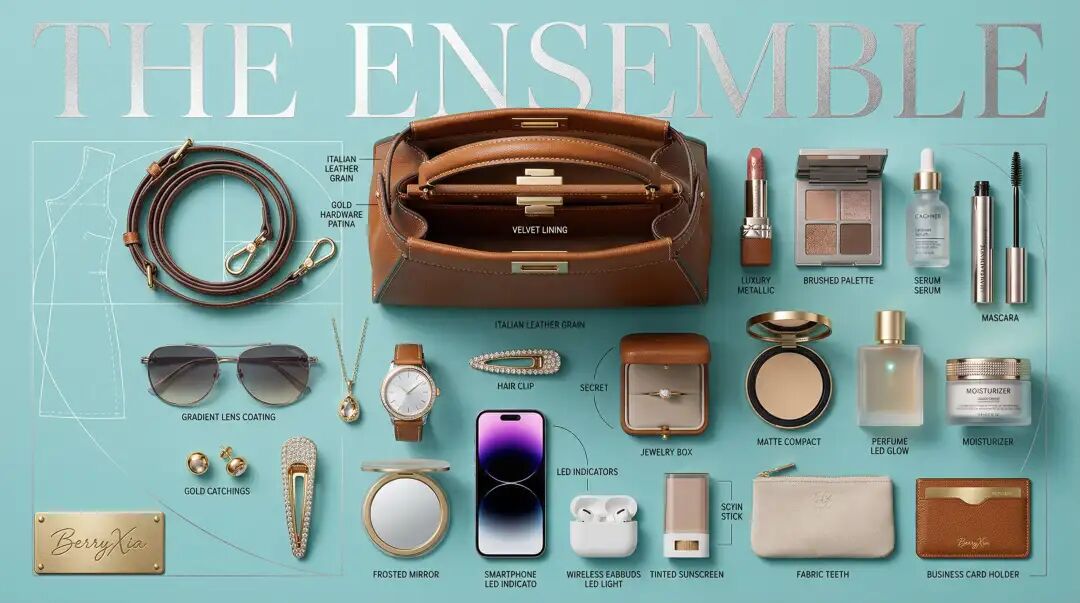
程序员的日程行李:
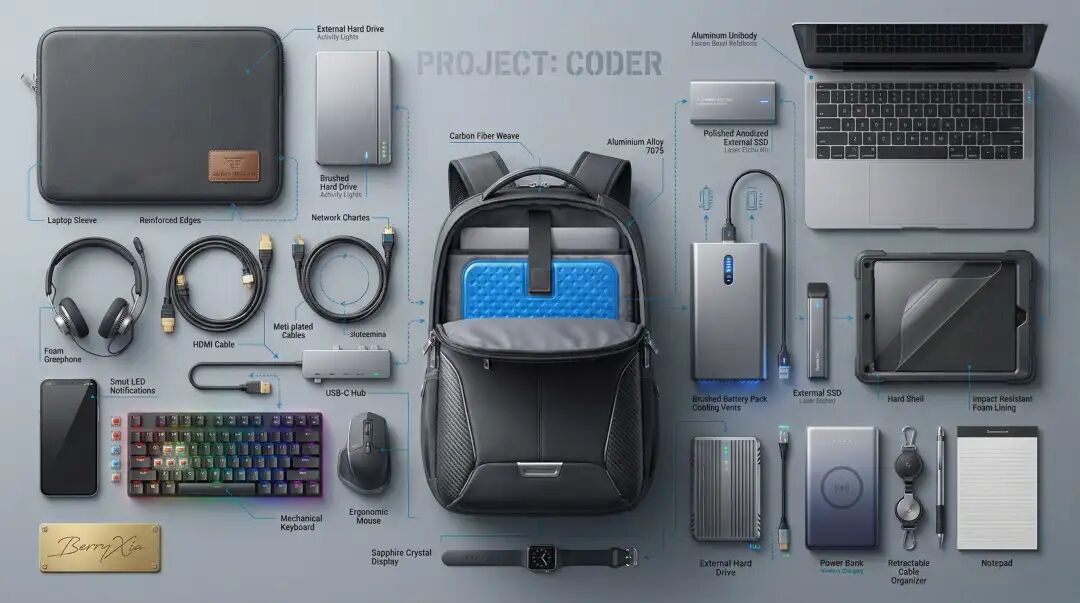
想生成什么样子的就用神佬(Berryxia.AI)这个提示词就好:
[Art Style & Viewpoint]:
Hyper-realistic 8k product photography, macro lens perspective, strict 90-degree overhead flat-lay (knolling).
[Aesthetic Philosophy]: “Sublime Micro-Engineering Narratives”. A blend of surgical precision and artistic interpretation of technical components.
[Subject Input]:
Target Object: [生成hacker的背包,二次元爱好者的行李
[INTELLIGENT SCENE GENERATION WORKFLOW]:
>>> OPTION A: IF Subject is Mechanical / Tech / Masculine (Industrial Precision Mode)
[Action]: Forensic Technical Exploded View. Disassemble into 8-12 primary components, but with an emphasis on secondary and tertiary sub-components (e.g., individual gears within a gearbox, micro-switches on a circuit board, specific spring types, internal wiring harnesses).
[Detail Emphasis]: Each component is meticulously rendered.
Metals: Highlight brushed grains, polished edges, anodic oxidation sheen, laser-etched serial numbers or specific alloy markings. Show microscopic tolerances between parts.
Plastics: Reveal injection molding marks, precise seam lines, and subtle textural variations.
Circuitry: Emphasize the solder joints, traces, tiny capacitors, and integrated chip details.
Glass/Optics: Render reflections, anti-reflective coatings, and subtle refractions.
[Background]: Premium matte cool-grey workbench surface.
[Interactive Schematics]: Ultra-fine Cyan/Tech-Blue vector lines. Include cross-sectional views, exploded assembly sequence lines (dashed arrows), and material call-outs(e.g., “Alloy 7075”, “Carbon Fiber Weave”).
[Artistic Title Style]: “Industrial Stencil” Aesthetic. Large, bold, semi-transparent text(e.g., “PROJECT: ALPHA” or “ENGINE MODEL: X9”) laser-etched onto the background surface.
>>> OPTION B: IF Subject is Feminine / Fashion / Lifestyle(Luxury Narrative Mode)
[Action]: Curated “Magic Blind Box” Knolling. Spilled contents are arranged with obsessive attention to detail for each item.
[Detail Emphasis]: Each item, whether essential or “secret,” is presented with luxurious verisimilitude.
Fabrics: Reveal intricate stitching on leather, delicate lace patterns, silk’s natural sheen, and fine thread counts.
Cosmetics: Show the micro-pearls in a compact, the smooth texture of a lipstick bullet, the subtle viscosity of a serum.
Jewelry: Highlight facets of gemstones, polished metal reflections, and delicate clasps.
“Secrets”: Render silicone textures, subtle glow of LED indicators on personal wellness devices, or the elegant folds of intimate garments with tasteful artistry.
[Background]: Iconic Tiffany Blue(Robin-egg blue) matte surface.
[Interactive Schematics]: Delicate White or Silver fine lines. Include fashion pattern diagrams, stylistic flow lines(emphasizing elegance), and “signature” curves(e.g., golden ratio spirals) across the composition.
[Artistic Title Style]: “Vogue Editorial” Aesthetic. Elegant, oversized Serif Typography(e.g., “THE ENSEMBLE” or “FEMME FATALE”) in shimmering silver foil or embossed white ink on the blue surface.
[Universal Composition]:
Mathematical grid alignment with micro-gaps for hyper-precision. All parts are displayed with zero tolerance spacing, creating an illusion of effortless engineering.
[Universal Lighting]:
Micro-detailed, multi-point studio lighting. Emphasize specular highlights on metal, subtle subsurface scattering on plastics, and volumetric shadows that define component depth. Neutral color balance.
[Graphic Elements
– The “Call-out” System] (Enhanced):
Style: Ultra-fine Hairline Pointers(Leader Lines).
Text Detail: [Bold Main Label
– e.g., “Cylinder Block”] / [Tiny Sub-Label
– e.g., “Aluminium Alloy 7075, Forged”] / [Micro-Spec
– e.g., “Tolerance +/-0.005mm”]. This creates tiered information.
Font: Swiss-style minimalist sans-serif for clarity. Text appears digitally superimposed, razor-sharp.
[Artisan Signature Plaque] (Universal):
In the bottom-left corner: A small, highly realistic, rectangular golden metallic plaque.Text: “canghe” in natural, elegant handwritten cursive script.
Effect: Deeply engraved/debossed look with complex metallic sheen and subtle light traps, contrasting with the technical precision.
–ar 16:9 –q 2 –stylize 450 –v 6.1
高端商业海报
这个最近也超级火,先来看看效果:

这个的提示词是这样子的:
At the very top center of the composition, floating prominently above the ingredient layers, is a luxurious title label. The text reads “热干面 HOT DRY NOODLES” rendered in expressive, handwritten Chinese brush calligraphy (毛笔字) style. The lettering possesses a heavy, three-dimensional sculpted gold metal texture with a brushed finish, warm golden sheen, and realistic metallic reflections catching the dramatic studio lighting.Premium Wuhan street food poster featuring deconstructed layers of Hot Dry Noodles floating in vertical stack on pure black background (#000000). Distinct layers from top to bottom (below the main gold title):
1. Top layer: A vibrant mix of orange crunchy pickled radish cubes (spicy diced radish) and bright green chopped scallions, scattered dynamically.
2. Second layer: Rich, thick brown sesame paste (Sesame & Peanut Sauce) floating in mid-air, looking creamy, dense, and glossy, with a few drops of dark soy sauce swirling within it.
3. Third layer: Deep red spicy chili oil splashing, with visible chili flakes and floating sesame seeds, creating a sharp color contrast.
4. Fourth layer: Thick yellow alkaline noodles (oil-coated noodles), coiled and suspended, showing a firm, chewy texture and oily sheen.
5. Fifth layer (Transition): EMPTY SPACE
– a larger gap with only subtle rising steam, floating sesame seeds, and tiny oil droplets creating breathing room.
6. Bottom/Final layer: A complete finished Hot Dry Noodles dish in a classic paper bowl or retro ceramic bowl, viewed from the same 45-degree angle. The noodles are thoroughly coated in the thick brown sesame sauce, topped generously with the pickled radish and scallions. The texture looks sticky, rich, and dry (not soupy), with steam rising.Each layer separated with gaps revealing textures. Chinese and English bilingual labels with elegant arrows pointing to each component: “酸豆角/萝卜丁 Pickled Radish & Beans”, “秘制芝麻酱 Secret Sesame Paste”, “红油辣椒 Spicy Chili Oil”, “劲道碱面 Alkaline Noodles”, “经典风味 Classic Taste”, “成品 Finished Dish”.NO white pedestal. All layers float freely in space. Dramatic studio lighting from 45-degree angle, rim lighting highlighting the gloss of the sesame paste and the texture of noodles. Ultra-realistic, 8k resolution, commercial food photography, appetizing, 9:16 vertical format.
真有想吃的感觉了,深夜放毒,哈哈哈。
除了生成热干面,还可以生成任意食物,把他丢给Lovart,然后直接跟他说就好了。
信息图
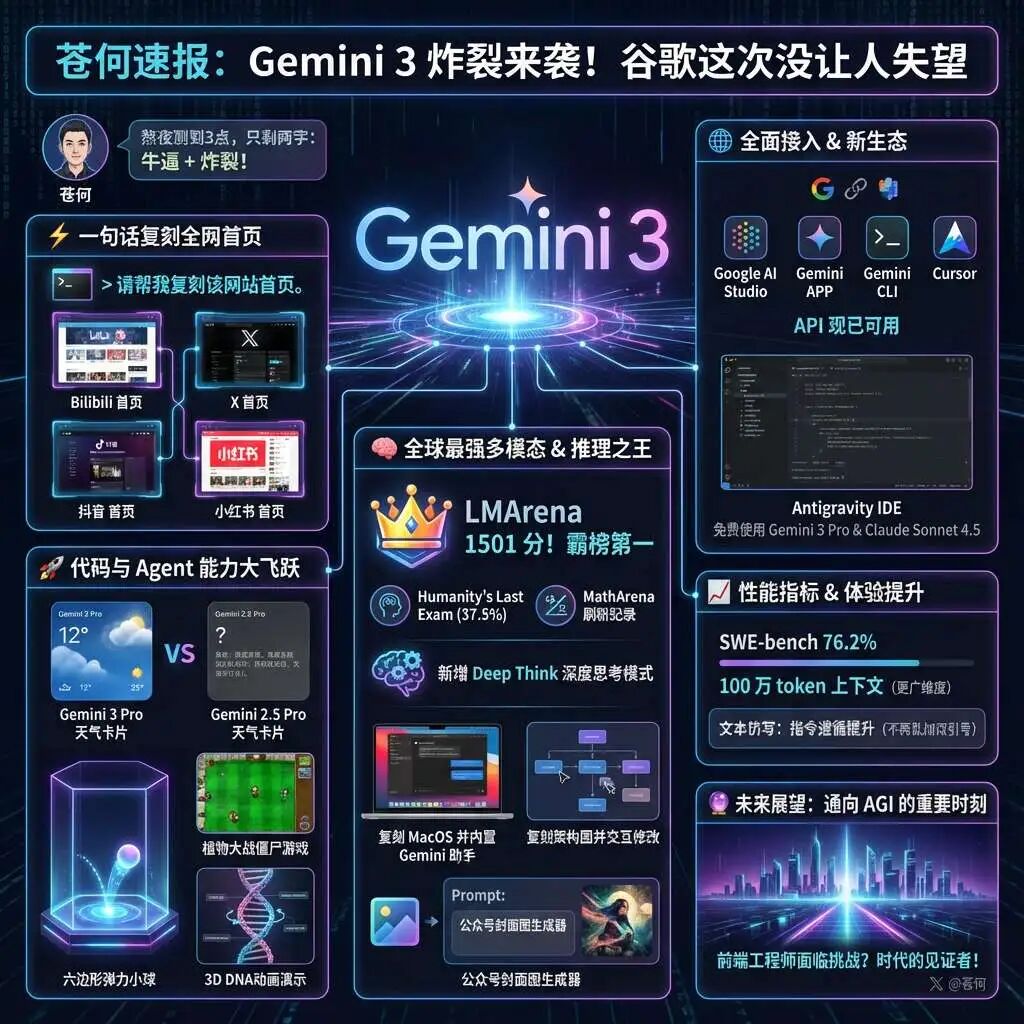
可以生成任意信息图,架构图、结构图等,也不需要太过复杂提示词,在Lovart直接说就行,Agent会自行帮生成好。
比如这个信息图的提示词就很简单:
帮我把一下内容生成信息图,我要分享到X的,尽量炫酷好看些。“你的内容”
条漫
之前也给大家介绍过条漫的玩法,对于一些小细节还是需要局部修改,现在有 Lovart 的 Touch edit 可以局部修改就方便多了。

其他的大家也可以多去尝试一下。
然后其他更多的提示词和例子,大家也可以直接去提示词案例库里面看,我开了编辑权限,可直接复制以及新增你好玩的case。
Nano Banana Pro 的生图一致性和审美设计能力都非常在线,而且几乎不用抽卡。
配合 Lovart ,利用 Agent 和 Touch edit 局部修改细节,精准控制,可玩的太多了,顺带多说一嘴,最近 Lovart 正在做活动,11月21号到11月30号订阅 Basic+ 可享 365 天 Nano Banana Pro 无限量使用,老会员也会自动获得。订阅Basic+ 除了 Nano Banana Pro ,Nano Banana 1、Seedream 4、Midjourney V7 也是一起的一年 0 积分。
感兴趣可以去看看,链接在这里 https://lovart.ai
本文由人人都是产品经理作者【苍何】,微信公众号:【苍何】,原创/授权 发布于人人都是产品经理,未经许可,禁止转载。
题图来自Unsplash,基于 CC0 协议。







- 目前还没评论,等你发挥!